
Photo with date, time and location: how to take one on iPhone
The iPhone camera records the date, time and place but hides them in the file. To get a photo with all three printed on it, use a GPS timestamp camera like Geoplate: allow location, pick a stamp with the time and address, and shoot. The stamp is part of the picture, so anyone who opens it sees it.
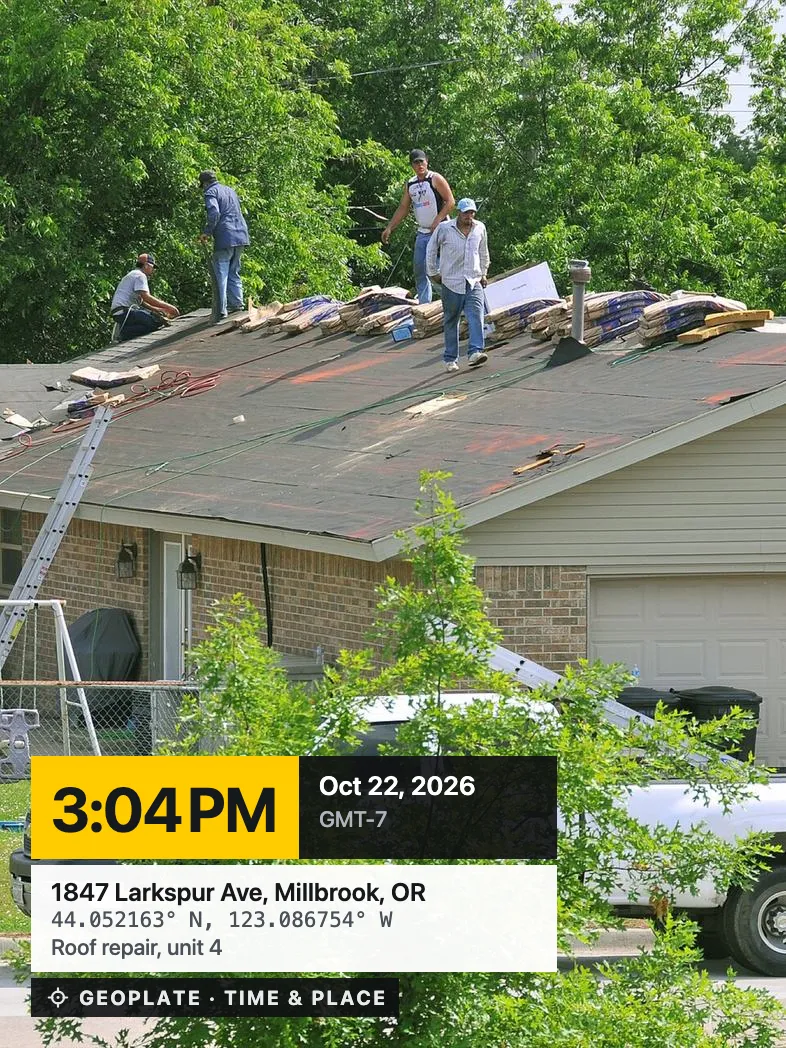
What the iPhone camera already saves
Every iPhone photo stores the date, the time and, with location on, the place. Swipe up on a photo in Photos and you'll see them. But they're hidden in the file, and many chat apps drop them when the photo is sent.
For a photo that shows when and where on its own, all three need to be on the picture. The built-in Camera can't do that. A timestamp camera can, and an editor like Markup can only if you type everything yourself.
Before you shoot: three settings
- Location for Geoplate: While Using the App, with Precise Location on. Without precise location the address is just the area.
- A connection, if you need the street address. Offline you still get the date, time and coordinates.
- Automatic time on your iPhone. The stamp uses your iPhone's clock and time zone, so keep Set Automatically on in Settings, General, Date & Time, especially when you travel.
Take the photo in Geoplate
- Open Geoplate. The stamp is live on the camera screen with the clock running.
- Swipe on the stamp to a template with time and place, like Time & Place or GPS Map.
- Check the address. If it's wrong, search for it, move the pin or type it in.
- Add a title or a note if it helps, like Unit 4, roof or Water stain, hallway.
- Shoot. Keep the photo in the app or save it to Photos.
In a hurry? On iOS 18 and later you can add Geoplate's Stamp Camera control to the Lock Screen and shoot before you unlock. Details are on the Lock Screen camera page.
Which fields to show
| Field | What it shows | Turn it on when |
|---|---|---|
| Date and time | Oct 22, 2026 3:04 PM, in your format | Always |
| Time zone | GMT-7 | The photo goes to someone in another time zone |
| Address | Street, number, city | Homes, sites, drop-offs |
| Mini map | A pin on a small map, standard or satellite | The address alone isn't clear |
| Coordinates | Decimal, DMS, UTM or MGRS | There's no street address: fields, trails, poles |
| Altitude and heading | How high, and which way the camera faced | Roofs, facades, hikes |
| Accuracy | How close the pin is | Precision matters |
| Title, note, your lines | Unit 4, Job #, Crew | Work photos |
| Project and logo | The project name, your logo | Jobs for clients |
Less is often clearer. A stamp with nine fields gets small on a phone screen, so turn off what the person looking at the photo doesn't need.
Check before you send
- Zoom in on the stamp: can you read the time and the address?
- Is the address the right building? If not, fix it on the shot in the app.
- Send the stamped copy, not the original from the camera roll.
- Keep the photos in a project for each job or place, so they don't mix.
The copy Geoplate saves to Photos has the same date and place inside the file as on the stamp, so it also shows up on the right day and on the Photos map.
If something's off
- No address, only coordinates. You were offline. Add the address later in the app.
- The stamp covers a detail. Drag it to another corner or pinch it smaller.
- No place on a Lock Screen shot. Location may not be ready before you unlock. Add the place on that shot in the app.
- You forgot the stamp. Stamp those photos later with their own date and place: see how to timestamp photos you already took.
Where to go next
Questions
How do I take a picture with the date and time on it on iPhone?
Use a timestamp camera app such as Geoplate. The built-in Camera saves the date in the file but can't print it on the picture.
How do I add my location to a photo on iPhone?
To save it in the file, allow location for the Camera. To print it on the picture, shoot with a GPS map camera. [Our geotagging guide](/guides/geotag-photos-iphone/) covers both.
Can I do it without an app?
Only by typing the date, time and place with Markup after the shot. Nothing prints them automatically in the built-in Camera.
Does it work offline?
Yes for the date, time and coordinates. The street address and the map need a connection.
Can I record a video with the date, time and location?
Yes. Geoplate records clips up to 10 minutes with the same stamp, and the time keeps running while you record.